How an Image to Video AI Generator Adds Motion to Still Photos
Making still images move: what it is and why it matters
For years, static images have carried the weight of storytelling, advertising, and personal memory. A photograph freezes a moment, but it cannot show what happened next. Video, on the other hand, demands a full sequence of frames, careful editing, and often a lot of time. The gap between a single picture and a moving clip has been wide, but recent developments in generative models are beginning to close it. An image to video ai generator sits right at that gap, turning a still photo into a short video clip with realistic motion, consistent subjects, and a sense of cinematic flow.
These tools do not simply animate a picture by panning or zooming. They infer how the scene might have evolved beyond the captured moment. The result is a video that feels like a natural continuation of the image, not just a digital effect. For content creators, marketers, and anyone who works with visual media, this capability changes how fast and how creatively they can produce short-form video content.
How an image to video model works under the hood
To understand what makes these generators useful, it helps to know a little about the underlying process. Most modern image to video tools use a type of neural network architecture built on latent diffusion. The model starts with a still image and a small amount of random noise, then gradually removes that noise while guided by the original picture. Over many steps, it constructs a sequence of frames that follow logically from the starting image.
A technique called video frame interpolation often plays a role here. The model may first generate a few key frames, then fill in the gaps between them to create smooth movement. Without interpolation, the motion would look jerky or skip frames. Another critical piece is temporal coherence, the property that ensures an object in one frame looks the same in the next. If a face changes shape or color between frames, the viewer notices immediately. Good models maintain subject consistency across the entire clip, so a person's features, clothing texture, and background details stay recognisable from start to finish.
Motion synthesis is the part of the process that decides how things move. The model learns from millions of real video clips what kinds of motion are plausible. A tree sways in the wind, water ripples, a person blinks. The model does not just copy one of those motions; it generates new movement that fits the specific image it was given. That is a hard problem because the model has to understand the scene's content and physics at the same time.

What an image to video ai generator can and cannot do
If you have never used one of these tools, the results can feel almost magical. You give it a single photograph, and a few seconds later you have a video clip that moves with purpose. But it is worth being clear about the limits. Most current models produce clips that last only a few seconds. Longer videos require stitching multiple clips together, which can break temporal coherence. The motion is realistic in many cases, but it can still produce odd artifacts: a hand that bends in an impossible way, or a background element that flickers.
The strength of these generators lies in short-form video. Social media posts, product demos, animated headers on a website, or quick visual explanations. For longer narrative work, traditional video production remains the standard. The trade-off is speed versus control. A generator can produce a clip in minutes that would take hours to shoot and edit, but you have less say over exactly how each element moves. You guide the result by choosing the input image and sometimes a text prompt, but the model fills in the details.
Another factor to consider is audio. Many image to video generators now include the option to add cinematic audio, background music or ambient sound that matches the mood of the clip. The audio is usually generated or selected algorithmically, not composed by hand. It can elevate the final piece from a silent animation to something that feels like a real video scene. But the audio quality and relevance depend heavily on the model's training data and how well it interprets the image content.
Building a practical image to video workflow
Getting good results from an image to video ai generator requires a bit of preparation. The input image matters more than anything else. A clear, well-lit photo with a simple composition will produce a smoother clip than a busy, low-contrast image. If the subject is a person, a front-facing portrait tends to work better than a profile, because the model has more examples of frontal faces in its training data. Backgrounds that are mostly one color or texture are easier for the model to animate consistently than chaotic patterns.
Here are a few things to check before you run a generation:
- Resolution and aspect ratio: match the output format you need. Cropping or stretching later reduces quality.
- Subject position: leave enough space around the main subject so motion does not cut them off at the edge of the frame.
- Lighting: even lighting helps the model maintain consistent colors across frames. Harsh shadows can cause flickering.
- Number of subjects: a single person or object is easier for the model to keep consistent than a group.
Once you have a good input, the generation itself is usually a matter of selecting a style or motion intensity, then waiting a short time. Most tools let you preview the clip and regenerate if the motion looks wrong. It is common to run several attempts with small tweaks to the image or settings before you get a result that feels right.
Where this technology fits in creative work
An image to video ai generator is not a replacement for video cameras or animation software. It is a new tool in a broader kit, best used for specific tasks. If you need to bring a product photo to life on a landing page, or turn a single event photo into a short social clip, it saves time and effort. If you need a 30-second narrative with specific dialogue and camera angles, traditional production is still the way.
One area where these generators shine is in prototyping. A designer can take a static mockup and animate it quickly to show a client how the final video might feel. The client sees motion, timing, and mood without anyone having to shoot footage or build complex animations. That speeds up the feedback loop and reduces the cost of early-stage exploration.
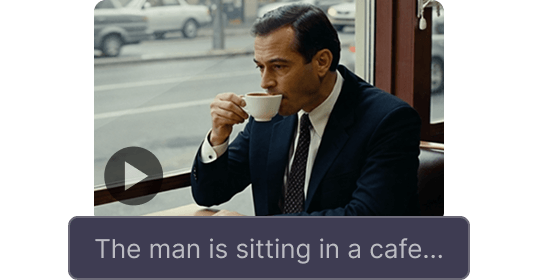
Another use case is repurposing existing image libraries. Many businesses have thousands of product shots, event photos, or architectural renderings. Instead of staging new video shoots, they can select the best stills and generate short clips from them. The output is consistent because the model works from their own images, not from stock footage. The generated clips can feed into social media calendars, email campaigns, or website hero sections.
Choosing the right tool and managing expectations
Not every image to video generator delivers the same quality. Some focus on speed and produce acceptable results quickly. Others prioritise realism and take longer to generate. If you plan to use the clips professionally, you want a tool that maintains subject consistency and temporal coherence across the entire clip. A model that loses the subject's face halfway through is not useful for a brand video. It is worth testing a few generations with your own images before committing to one platform.
At the same time, the field is moving fast. Models that struggled with motion quality a year ago now produce impressive clips. The barrier to entry keeps dropping. You do not need to understand latent diffusion or video frame interpolation to use these tools. You just need a clear image and a sense of what kind of motion fits the scene. The model handles the technical steps.
One tip for getting more reliable results: keep the motion subtle. A gentle breeze through hair, a slow camera push, or a slight turn of the head looks more natural than fast, dramatic movement. Fast motion tends to expose the model's limitations and produces more artifacts. If you want energetic motion, consider generating multiple shorter clips and editing them together, rather than asking the model to create a single high-motion clip from one image.
Audio is another place to experiment. A clip that looks good but has no sound feels incomplete. Many generators now offer cinematic audio that is matched to the image content. The audio might be ambient wind for an outdoor scene or a soft piano for a portrait. If the model's choice does not fit, you can always mute the generated audio and add your own track in a video editor. That gives you more control without losing the convenience of the generation step.
What to watch out for
As with any generative tool, there are a few things to keep in mind. The model can only produce what it has seen in training. If your image contains a rare object, unusual lighting, or a composition that is far from typical, the output may be unpredictable. The model might hallucinate details that were not in the original image, or it might fail to animate parts of the scene at all. Always review the generated clip carefully before publishing it.
Another concern is consistency across a series. If you generate ten clips from ten different images, the visual style will vary because each clip is generated independently. For a branded feed or a product showcase, you may need to apply color grading or other post-processing to make the clips feel like a cohesive set. That is normal, but it adds a step to the workflow that some people do not anticipate.
Finally, keep in mind that an image to video ai generator is a tool for iteration, not for one-shot perfection. The best results come from trying multiple inputs, adjusting settings, and selecting the best output. Treat it as a collaborator that handles the heavy lifting of motion synthesis, while you guide the creative direction.
Looking ahead
The quality of generated video from still images will keep improving. Models are getting better at temporal coherence, handling longer clips, and producing more realistic motion. For now, the sweet spot is short clips of a few seconds, generated from a single high-quality image, with subtle motion and optional audio. That is already enough to save time and unlock creative ideas that would have been impractical with traditional video production.
If you work with visual content regularly, it is worth trying an image to video ai generator on a few of your own images. The results may not always be perfect, but they will show you what is possible and where the technology can fit into your existing workflow. Even with its current limitations, it is a practical addition to the creative toolkit, especially for anyone who needs to produce short-form video quickly and at scale.